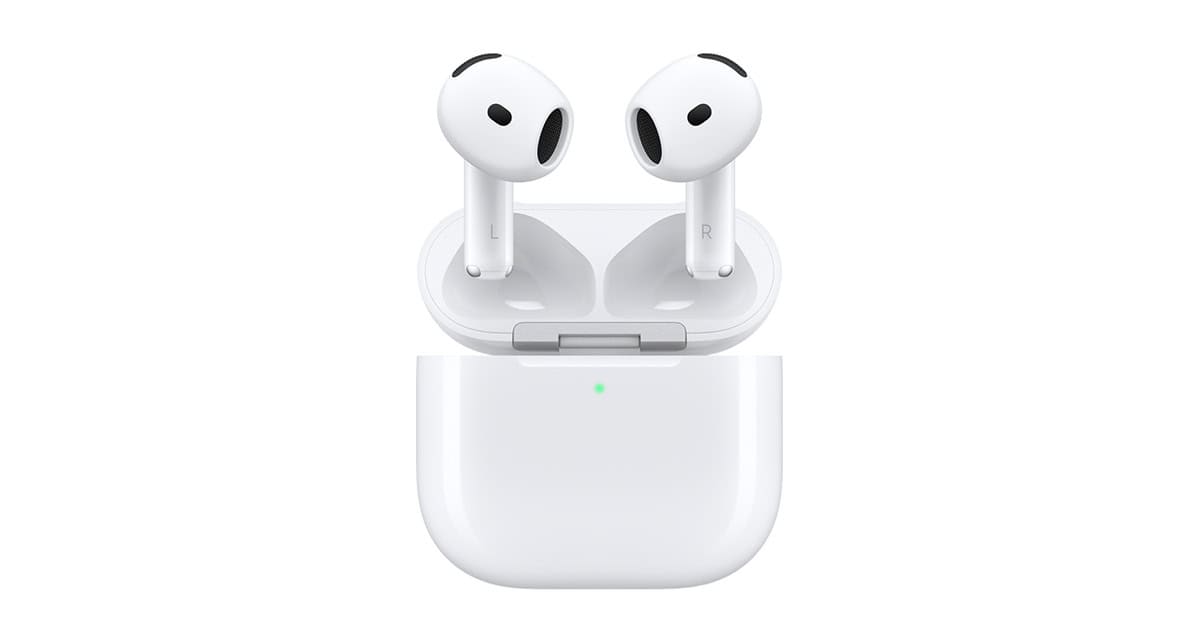
Apple has made a big change to its AirPods 4 design by removing the physical pairing button found on earlier models. The new AirPods 4 now feature a hidden capacitive button on the front of the charging case instead of the traditional physical button on the back. This subtle design change aims to make the earbuds look cleaner while still providing necessary functionality for users.
To use this new hidden button, owners need to open the AirPods 4 charging case and double-tap the front where the hidden button is located, just below the status light. This triggers the pairing mode, allowing users to connect their AirPods to their devices. The same area can be used for resetting the AirPods when needed.
This design change represents Apple’s ongoing effort to streamline the user experience and create more intuitive products. By removing visible buttons, Apple continues its minimalist design philosophy while maintaining essential functions. The move follows industry trends toward touch controls and sleeker designs in wireless earbuds.
AirPods 4: Physical Changes and Latest Features – Complete Guide
Apple’s AirPods 4 continue Apple’s evolution of truly wireless earbuds, focusing on comfort, smarter features, and tighter integration with the Apple ecosystem. While the design changes are subtle, the internal upgrades and software enhancements make a noticeable difference in everyday use.
Below is a complete breakdown of what’s new physically and which features matter most.
1. Physical Changes in AirPods 4
Refined Earbud Shape
- Slightly shorter stem compared to AirPods 3
- Improved weight distribution, making them feel more secure in the ear
- Contoured design aimed at reducing ear fatigue during long listening sessions
The changes are subtle but noticeable, especially for users who found earlier models slightly loose.
Lighter and More Compact Case
- Charging case is smaller and lighter
- Rounded edges for easier pocket carry
- Improved hinge durability
Despite the smaller size, battery capacity remains competitive.
Improved Fit for More Ear Types
- Apple refined the acoustic vent placement
- Better passive noise isolation even without silicone tips
- More stable fit during walking or light workouts
While still an open‑ear design (no ear tips), comfort has improved for a wider range of users.
2. Latest Features in AirPods 4
Enhanced Sound Quality
- Improved dynamic drivers for clearer highs and richer bass
- Better vocal separation for calls and podcasts
- More consistent volume levels across music genres
Sound tuning focuses on balance rather than heavy bass.
Adaptive Audio (Smarter Listening)
AirPods 4 introduce a more refined Adaptive Audio, which:
- Blends transparency and noise reduction automatically
- Adjusts sound based on your environment (home, street, office)
- Responds in real time as noise levels change
This makes switching modes mostly unnecessary.
Personalized Spatial Audio
- Uses head tracking for immersive sound
- Custom audio profile based on your ear shape (via iPhone scan)
- Enhanced experience for movies, TV shows, and supported music
Works best with Apple TV+, Apple Music, and FaceTime.
Improved Call Quality
- Upgraded microphones with better wind noise reduction
- Clearer voice isolation in busy environments
- More natural voice tone during calls
Great for frequent phone and video calls.
Better Battery Efficiency
- Longer listening time per charge
- Faster charging in the case
- Improved standby efficiency when not in use
While battery life gains are incremental, real‑world performance is more consistent.
Smarter Siri Interactions
- Faster Siri response times
- More reliable voice detection
- Hands‑free control for music, calls, messages, and navigation
Ideal for users deeply integrated into Apple’s ecosystem.
3. Connectivity and Compatibility
- Uses Apple’s latest wireless chip for faster pairing
- More stable Bluetooth connection
- Automatic switching between Apple devices (iPhone, iPad, Mac, Apple Watch)
Works best on newer versions of iOS, iPadOS, and macOS.
4. Who Should Upgrade to AirPods 4?
AirPods 4 are ideal if you:
- Own AirPods 1 or 2
- Want better sound and call quality without silicone tips
- Value smart audio features over heavy noise cancellation
- Use multiple Apple devices daily
You may want to wait or choose another model if:
- You prefer silicone ear tips
- Active Noise Cancellation is a must-have
- You already own AirPods Pro (2nd gen)
5. Final Thoughts
AirPods 4 don’t reinvent the design—but they refine it in meaningful ways. The improved fit, smarter audio features, and better call quality make them a strong upgrade for casual listeners and Apple power users alike.
If you want effortless wireless earbuds with intelligent features and Apple-level polish, AirPods 4 are a solid choice.
Key Takeaways
- AirPods 4 replaced the physical pairing button with a hidden capacitive button on the front of the case.
- Users activate pairing mode by opening the case and double-tapping the front area below the status light.
- The redesign creates a cleaner look while maintaining all functionality of previous AirPods models.
Evolution of AirPods Design
Apple’s AirPods have undergone significant design changes since their first release, moving from physical controls to more seamless interfaces that blend form with function.
From Physical to Capacitive: The Shift in AirPods Buttons
The most notable change in recent AirPods generations is the elimination of the physical button. Earlier AirPods models featured a small button on the back of the charging case, primarily used for pairing with devices. This button required users to press it to activate pairing mode.
The AirPods 4 charging case now has a discreet system without visible buttons. Instead of pressing a physical button, users can open the case and double-tap the front where the hidden capacitive button is located. This new method makes the pairing process more intuitive while maintaining the clean aesthetic.
This shift reflects Apple’s broader design philosophy of “less is more.” The move replaces physical buttons with touch-responsive elements, similar to how the AirPods themselves use stem touches rather than buttons for control.
Aesthetics and Functionality in AirPods 4
The AirPods 4 design takes minimalism to new heights with its completely button-free exterior. This cleaner look follows Apple’s commitment to sleek, uninterrupted surfaces that have become their signature style.
The redesigned case not only looks more polished but also improves user experience. The new capacitive pairing method is more aligned with how users naturally interact with the device – through taps rather than presses. This creates a more consistent interaction model across the entire AirPods ecosystem.
Apple has also relocated the air vent that was previously positioned near control areas in the AirPods Pro 2. This change accommodates the new interactive zones while maintaining necessary airflow functions.
The AirPods 4 comes in two variants, both featuring the updated button-free design. This approach shows how Apple balances aesthetic considerations with practical functionality, creating products that are both beautiful and intuitive to use.
Enhanced Pairing and Control Features
Apple has made significant changes to how users interact with the new AirPods 4. The physical button is gone, replaced with hidden touch controls that offer a cleaner design while maintaining functionality.
New Pairing Process with AirPods 4 Charging Case
The AirPods 4 Charging Case has eliminated the traditional physical setup button found on previous models. Instead, Apple has implemented a hidden capacitive button on the front of the case. This change creates a cleaner, more streamlined design without sacrificing functionality.
To pair AirPods 4 with a device:
- Open the charging case lid
- Double-tap the front of the case where the hidden button is located
- The LED indicator will flash white to show pairing mode is active
The hidden button area is located on the front face of the case, not on the back where users of previous AirPods generations would expect to find it. This redesign is part of Apple’s ongoing effort to move away from physical buttons for a more elegant appearance.
Users can also reset their AirPods 4 to factory settings using this same capacitive area. The status light has been repositioned to complement this new interaction method.
Managing Active Noise Cancellation Without a Physical Button
With the removal of physical buttons, the AirPods 4 relies on touch controls for managing Active Noise Cancellation (ANC) and other features. The ANC controls are now handled through touch-sensitive areas on the earbuds themselves.
Users can toggle between ANC modes by:
- Pressing and holding the stem of either AirPod
- Using the Control Center on their iPhone
- Asking Siri to change the noise control mode
This change aligns with the design language of the AirPods Pro 2, creating consistency across Apple’s audio product line. The touch controls offer multiple functions beyond ANC management:
Touch Control Functions:
- Single press: Play/pause
- Double press: Skip forward
- Triple press: Skip backward
- Press and hold: Toggle ANC/Transparency
The removal of physical buttons not only improves the aesthetic appeal but also enhances water resistance. For iPhone 16 users, the AirPods 4 offers improved integration with iOS, allowing for quicker adjustments through the Control Center and Settings app.